# Kali Linux

This is for Kali Linux

# Upgrading Kali from previous version to Version 2025.3

### Problems

When running the apt update or apt upgrade in Kali to the latest version the following error asppears.

[![image.png](https://nacinocomputernetworks.com/uploads/images/gallery/2025-09/scaled-1680-/PvfqDPqXScpSb698-image.png)](https://nacinocomputernetworks.com/uploads/images/gallery/2025-09/PvfqDPqXScpSb698-image.png)

To resolve this issue we can perform the following:

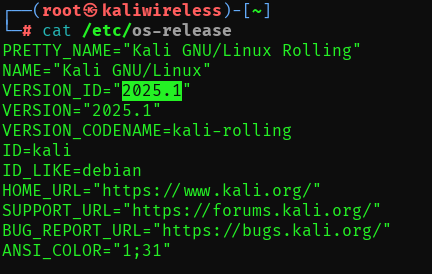
Get the current version of the OS with the following command.

<p class="callout success">cat /etc/os-release</p>

[![image.png](https://nacinocomputernetworks.com/uploads/images/gallery/2025-09/scaled-1680-/sByMOW43krzUkhLO-image.png)](https://nacinocomputernetworks.com/uploads/images/gallery/2025-09/sByMOW43krzUkhLO-image.png)

1\. Download the keyring

<p class="callout success">wget [https://http.kali.org/kali/pool/main/k/kali-archive-keyring/kali-archive-keyring\_CURRENT\_VERSION\_all.deb](https://http.kali.org/kali/pool/main/k/kali-archive-keyring/kali-archive-keyring_CURRENT_VERSION_all.deb)</p>

<p class="callout info">https://http.kali.org/kali/pool/main/k/kali-archive-keyring/kali-archive-keyring\_**2025.1**\_all.deb</p>

2\. Install the keyring

<p class="callout success">sudo dpkg -i kali-archive-keyring\_CURRENT\_VERSION\_all.deb</p>

<p class="callout info">sudo dpkg -i kali-archive-keyring\_2025.1\_all.deb</p>

3\. Perform the update

<p class="callout success">sudo apt update -y</p>

4\. Perform the upgrade

<p class="callout success">sudo apt upgrade -y</p>

5\. Perform the FULL upgrade

<p class="callout success">sudo apt full-upgrade -y</p>